
The Goospin app gives Australian players mobile access to pokies, live casino games, sports betting, AUD payments, bonuses and account settings on iOS and Android. The app uses the same Goospin login and balance as the main website, so players can move between desktop and mobile without creating another profile.
GOOSPIN also works through a mobile browser, giving players a handy alternative when they do not want to install software. The mobile version keeps the familiar dark layout, fixed navigation and direct access to Home, History, Promo, Live Chat and Settings.
The main app and mobile-access details are summarised below. A current version of iOS or Android and a stable connection provide the best performance.
| Mobile feature | Goospin app details |
|---|---|
| iOS access | Goospin app for iPhone and iPad |
| Android access | Goospin app for Android devices |
| Alternative access | Mobile browser |
| Account | Same Goospin login as desktop |
| Currency | AUD |
| Games | Pokies, crash games and available live, sport and fast-game sections |
| Promotions | Promo area available from the fixed navigation |
| Cashier | Deposit and withdrawal controls attached to the account |
| Notifications | Promotion, game and bonus updates |
| Home-screen shortcut | Available through iOS and Android browser menus |
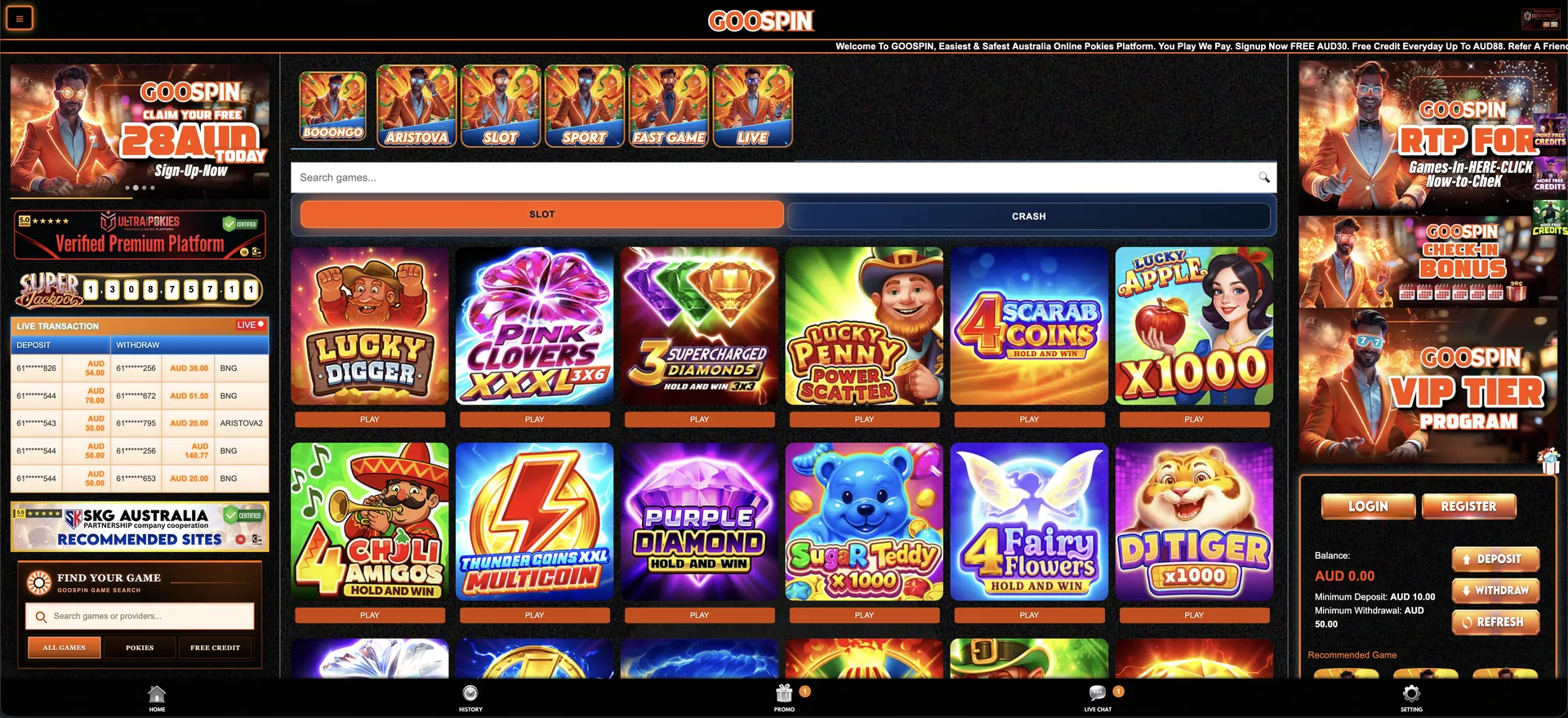
Goospin app availability
GOOSPIN provides mobile app access for iOS and Android, covering the same core casino functions available on desktop. Players can browse pokies, open live games, manage promotions, use the cashier and contact support from one mobile account.
The app should be obtained through the GOOSPIN mobile page or the download route supplied by the casino. The browser version remains available for players who prefer instant access without installing anything.
How to download the Goospin app
The download process starts from the GOOSPIN mobile page. Choose the iOS or Android option that matches the device, follow the installation instructions and use the existing account details after the app opens.
- Open the GOOSPIN website on the iPhone, iPad or Android device.
- Select the app option for the correct operating system.
- Follow the download and installation prompts.
- Open the app and allow optional promotion notifications if wanted.
- Select Login and enter the existing mobile number or username and password.
- Use Register and SMS verification when creating a new account.
The app uses the same account balance as desktop. Deposits, withdrawals and promotions are connected to one profile rather than separate app and website balances.
Add Goospin to an iPhone or iPad home screen
Safari allows a website shortcut to appear with regular app icons. The shortcut opens the saved Goospin page in the browser and can be removed at any time without affecting the casino account.
- Open the Goospin site in Safari.
- Select the Share button.
- Scroll through the available actions.
- Select Add to Home Screen.
- Confirm the shortcut name and select Add.
The shortcut does not require App Store credentials and does not install a native package. Website updates appear automatically the next time the shortcut is opened.
Add Goospin to an Android home screen
Chrome and several other Android browsers provide an Add to Home screen or Install app-style shortcut option. The wording depends on the browser, but the result is still a direct link to the mobile website.
- Open the Goospin site in Chrome or the preferred Android browser.
- Select the browser menu, usually shown as three dots.
- Select Add to Home screen or the equivalent shortcut command.
- Confirm the name and placement.
- Open the new icon to confirm that it leads to the expected address.
Android players who prefer not to install the app can keep using the home-screen shortcut. Both routes lead to the same GOOSPIN account and AUD balance.
Features available through Goospin mobile
The Goospin app brings the principal casino sections into one mobile layout. The navigation provides quick access to Home, History, Promo, Live Chat and Settings, while the account panel contains balance and cashier controls.
- Pokies: search and category access for the available slot catalogue.
- Crash games: a separate tab for titles such as Mad Wing and RikshaX.
- Other categories: shortcuts for Live, Sport and Fast Game content.
- Promotions: free credits, red packets, rebates and VIP campaigns.
- AUD balance: one account balance shared with desktop access.
- Cashier controls: Deposit and Withdraw buttons within the account area.
- Support: Live Chat available through the navigation.
Goospin pokies on iPhone and Android
The Goospin app includes the same visible game categories used by the main site. Australian users can search for a title or browse a grid of pokie cards before selecting Play. Game availability, rules, stake limits and orientation are controlled by the individual title and provider.
Examples in the GOOSPIN catalogue include Lucky Digger, Pink Clovers XXXL 3x6, 4 Scarab Coins, Purple Diamond Hold and Win, Sugar Teddy x1000, DJ Tiger x1000, Fire Coins and Buffalo Power 2. A stable private connection is preferable when a game uses animated assets or a real-time stream.
Mobile registration and Goospin login
Registration on mobile uses the same details as desktop: full name, mobile number, 6–20 character password, optional referrer code and an SMS verification code. The full name must match the player’s bank account name. Existing users sign in with a registered mobile number or username and password.
The mobile registration sequence follows these account steps. SMS delivery requires access to the number entered in the form.
- Select Register from the mobile account panel.
- Enter the full name and Australian mobile number.
- Create a 6–20 character password.
- Add an optional referrer code if applicable.
- Select Get Code and enter the SMS verification code.
- Select Register to create the profile.
Mobile bonuses and VIP access
The Promo button opens the available Goospin campaigns in the app. Advertised offers include free AUD 30 for new users, daily credits up to AUD 88, daily and weekly red packets, a daily rollover rebate, weekly win/loss cashback and a five-tier VIP programme.
App notifications keep players informed about new promotions, free-credit claims and bonus status. Notification preferences can be adjusted on the mobile device.
Deposits and withdrawals on mobile
The account panel displays Deposit and Withdraw controls beside the AUD balance. It lists a minimum deposit of AUD 10 and a minimum withdrawal of AUD 50. Method-specific limits, fees, processing windows and verification requirements should be checked in the mobile cashier immediately before a transaction.
Mobile payment safety depends on protecting both the casino account and the device. Useful checks include the following precautions.
- Use a private mobile or Wi-Fi connection for account transactions.
- Confirm the site address before entering payment details.
- Keep the device operating system and browser current.
- Do not approve a transaction requested through an unsolicited message.
- Save confirmation details until the balance and history are updated.
Troubleshooting Goospin mobile access
A loading or display problem does not normally require a new account or unknown app download. Browser settings, stored site data and network conditions should be checked first.
The page does not fit the screen
Rotate the device, return browser zoom to its default setting and reload the page. A current browser generally handles responsive layouts more reliably than an old embedded browser opened inside another app.
A game does not launch
Check the connection, disable script-blocking extensions for the session and confirm that the title is still active in the catalogue. Another pokie can help determine whether the issue affects one provider or the entire site.
The login session closes
Expired cookies, privacy settings or switching between several network connections can end a session. Sign in again through the genuine page and avoid repeatedly refreshing during account actions.
The home-screen shortcut fails
Delete only the shortcut, open the current site address in the browser and add it again. Removing a shortcut does not remove the Goospin account or its AUD balance.
Goospin app FAQ
The following answers explain how Australian players can download, install and use GOOSPIN on mobile.
Is the Goospin app available for iPhone?
Yes. GOOSPIN provides iOS mobile access for iPhone and iPad, with the mobile website available as an alternative through Safari.
Is the Goospin app available for Android?
Yes. Android players can use the GOOSPIN mobile download route or open the casino directly through Chrome, Samsung Internet or Firefox.
Can Goospin be added to the home screen?
Yes. Safari and Android browsers can create a home-screen shortcut when the player prefers the mobile site instead of an installation.
Are the same pokies available on mobile?
The mobile site provides access to the Goospin catalogue, although individual game availability and device compatibility can change by provider.
Does mobile Goospin use AUD?
Australian account information is displayed in AUD, including the account balance and the advertised minimum deposit and withdrawal values.
Is another registration required on mobile?
No. The existing Goospin login works across compatible devices. New users can complete the same mobile-number and SMS registration form in a mobile browser.
GOOSPIN is intended for adults who are legally permitted to gamble. Use spending and time limits, and install the app only through the casino’s official mobile route.